
Table Tent & Menu Stand QR Codes for Hospitality
Table tents live in ketchup-splash range. Codes need to be large, high contrast, and tied to one clear job — menu, Wi‑Fi, feedback, or ordering — not four tiny icons fighting for attention.
Key takeaways
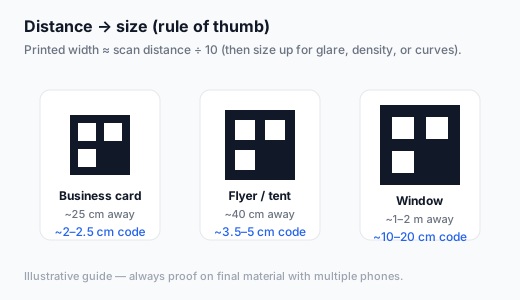
- Aim for 3–4 cm+ code width on tents; larger for multi-seat tables.
- One primary CTA per face beats a collage of five networks.
- Use durable lamination; wipeable surfaces get dirty codes that stop scanning.
- Stable URLs for menus; separate codes for Wi‑Fi strings and reviews.
- Export SVG or 1200px+ PNG from a free generator for crisp print.
What each face should do
| Face / panel | Encode | Label copy |
|---|---|---|
| Menu | Mobile menu URL | “Scan for full menu & allergens” |
| Wi‑Fi | WIFI:… string | “Scan to join guest Wi‑Fi” |
| Reviews | Google review link | “Enjoyed your visit? Leave a review” |
| Order / pay | Order-ahead or tip link | Match what staff can support at peak |
Deep dives: menu QR, Wi‑Fi QR, review QR.
Production steps
- Finalize URLs and test on mid-range Android + iPhone over cellular.
- Generate codes in the generator with dark-on-light styling.
- Design tents with quiet zones and a short human CTA.
- Print one table proof; scan seated from a guest’s posture.
- Roll out; schedule wipe-downs so grease does not matte the modules.
FAQ
Double-sided tent with different codes?
Yes — menu on one side, Wi‑Fi on the other works well.
Acrylic stands with small inserts?
Measure the visible window; do not assume the full insert width is scannable if frames crop edges.
Generate hospitality QR codes free
Create free QR codeNo login. Generated in your browser. Download as SVG, PNG, or JPG.