
Pre-Print QR Checklist (Proof, Distance, Material)
Most QR disasters are preventable with a boring checklist. Run this before you approve a box of flyers, a packaging dieline, or a window vinyl order.
Key takeaways
- Validate the URL and the full mobile journey before designing.
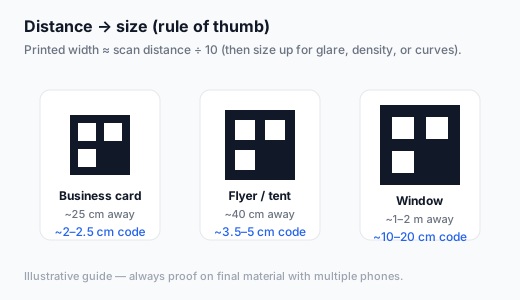
- Size for real distance; export SVG or large PNG — never a screenshot.
- Proof on final (or similar) material with at least two phone brands.
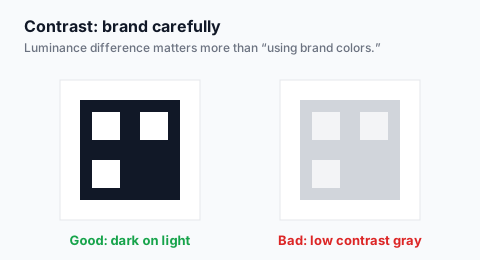
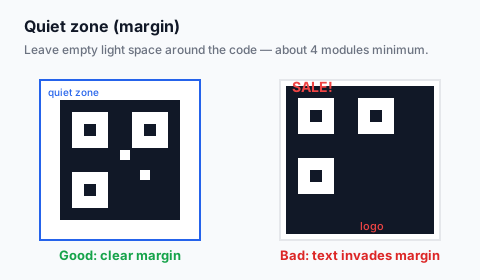
- Check contrast, quiet zone, glare, and crop marks explicitly.
- Archive the exact file and URL with the job ticket.
Checklist
1. Destination
- □ Final HTTPS URL (or WIFI string) frozen
- □ UTMs or unique path added if measuring
- □ Mobile page loads on cellular in under a few seconds
- □ Offer/message matches the print copy
2. File
- □ Generated via qrcodefree.win (or equivalent) — not a phone screenshot
- □ SVG preferred for print; else 1200–3600px PNG
- □ Dark modules on light background unless reverse rigorously tested
- □ Quiet zone preserved in layout
3. Physical proof
- □ Printed at final size on similar stock
- □ Scanned with iOS and Android
- □ Tested at real distance and angle
- □ Checked under expected lighting (sun, store LEDs, evening)
- □ Glare checked on gloss / window
4. Handoff
- □ Printer receives vector or sufficient DPI raster
- □ Color profile noted if brand colors are used in modules
- □ File named and archived with campaign ID
- □ Fallback short URL printed as text when space allows
Final high-res export free
Create free QR codeDownload SVG or large PNG, then run the proof checklist.
If something fails
Use the not scanning guide for technical failures and the low scan rate guide when the code works but people ignore it.
FAQ
How many proof scans is enough?
At least two devices, three angles, and both near/far edges of the expected distance range.
Can I skip proofs for digital-only QR?
Still test display size on a real phone. Digital is easier — not automatic.
Create your final print QR free
Create free QR codeNo login. Generated in your browser. Download as SVG, PNG, or JPG.