
Social Profile & Bio QR Codes for Offline-to-Online
Offline moments — booths, packaging, stage slides — still need a clean path to your social presence. A static QR to a profile or link hub beats spelling @handles over music.
Key takeaways
- Encode a stable profile URL or link-in-bio page you control.
- Prefer one hub link when you promote multiple networks.
- Platform “native” QR stickers are optional; a free static code works everywhere.
- Print large enough for the viewing distance; contrast over aesthetics.
- Use UTMs if you care which offline surface drove the follow.
Profile URL vs link hub
| Destination | Best when | Watch-outs |
|---|---|---|
| Single network profile | You only care about one platform | App interstitial friction |
| Link-in-bio / personal site | Multiple CTAs (shop, socials, email) | Keep the hub fast and focused |
| Campaign landing page | Launch or promo tied to print | Retire carefully after the campaign |
Create the code free
- Copy the final HTTPS URL from a browser (not a truncated share sheet).
- Optional: add
utm_source=poster&utm_medium=qr&utm_campaign=brand. - Paste into the generator, high contrast, export SVG/PNG.
- Place on booth banners, packaging, stickers, or slides with a short CTA (“Follow for drops”).
Encode your profile or bio URL free
Create free QR codeNo account. Static QR you can reprint anytime.
Design notes
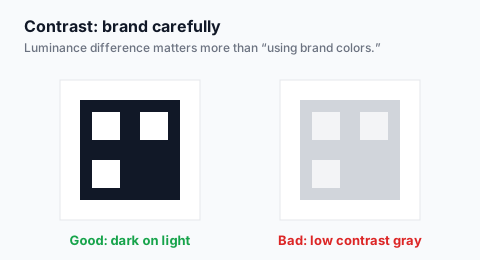
- Do not rely on platform-colored modules if contrast drops
- On dark posters, use a white plate behind a dark code
- On slides, animate nothing that covers the code during Q&A
FAQ
Instagram’s built-in QR vs this tool?
Native codes can deep-link nicely inside the app. A standard URL QR is more portable across print vendors and other networks.
One code for all channels?
Yes — use a hub page. Update hub buttons without reprinting if the QR stays pointed at the same URL.
Create your social QR free
Create free QR codeNo login. Generated in your browser. Download as SVG, PNG, or JPG.