
Real Estate Yard Sign & Listing QR Codes
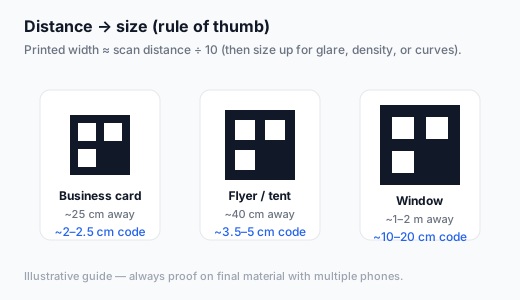
Drivers will not stop in traffic to scan a postage-stamp code. Yard sign and flyer QRs must be large, high contrast, and pointed at a mobile listing or tour experience that loads fast.
Key takeaways
- Encode the listing, virtual tour, or open-house form — not a generic brokerage homepage.
- Size for curb distance; think poster-scale modules on yard signs.
- Weatherproof materials and sun glare need extra size and matte finishes.
- Use unique UTMs per sign location when you want geo insights.
- Static codes are fine when the listing URL remains valid for the campaign.
Best destinations
- MLS/listing mobile page
- Branded property microsite
- Tour booking or open-house RSVP
- Agent contact hub (secondary)
Yard sign specs
- Often 10–20 cm+ code width depending on setback from the road
- Place at a height scanners can frame without crouching into bushes
- Pair with a short readable URL for accessibility
- Re-check after rain and UV fade
Create the code
- Freeze the listing URL and tracking parameters.
- Generate a high-contrast code in the generator (SVG or large PNG).
- Mock at full size; scan from the actual curb if possible.
- Send vector files to the sign printer; archive by MLS number.
Encode your listing or tour URL free
Create free QR codeLarge high-res export for yard signs and flyers.
FAQ
Sold / withdrawn listings?
Update the page to a “no longer available” state or agent contact — do not leave a 404 on street signs.
One code for the whole brokerage?
Weak for performance insight. Prefer per-listing or per-campaign URLs.
Create real estate QR codes free
Create free QR codeNo login. Generated in your browser. Download as SVG, PNG, or JPG.